AI PPT Tools: Comparative Case Study
1. Executive Summary
Professional services teams spend significant time creating client proposals, often struggling with AI tools that promise automation but fail to meet enterprise requirements. This case study evaluates leading AI presentation tools to determine which can actually deliver production-ready proposals that maintain corporate branding, use reference materials effectively, and integrate into existing workflows.
We tested six tools—NorgAI, Claude PPT Add-in, Replit Agent 4, ChatGPT, Gamma, and Gemini in Google Slides—using a real-world scenario: generating a business proposal from an 80-slide corporate master deck and an RFP document.
The bottom line: NorgAI emerged as the clear leader for enterprise use, being the only tool that fully preserves corporate branding while delivering fast, complete, and traceable output. The other tools showed significant limitations—from losing color themes to broken layouts to one-slide-at-a-time generation to missing traceability—that make them unsuitable for professional proposal workflows.
2. Methodology
What is a Corporate Master Deck?
A corporate master deck is an organization’s official PowerPoint presentation built using their corporate branding guidelines. It serves as both a design template and a content repository. It includes:
- Brand identity: Company logos, color schemes, and typography
- Pre-designed slide layouts: Title slides, content slides, section headers, tables, charts, etc.
- Reusable content library: A collection of slides with actual content covering various sections (e.g., About Us, Methodology, Case Studies, Team Structure, Pricing) that teams can reuse and adapt for new proposals
The key value of a corporate master deck is the reusable content—existing slides that have been refined over time and can be adapted for each new client engagement. The RFP document provides client-specific requirements that guide how the master deck content should be customized.
For this study, each tool was provided the same corporate master deck to evaluate how well they preserve branding and leverage existing content.
What We Tested
We gave each tool the same challenge: generate a complete business proposal using a corporate master deck (80 slides with established branding, color themes, fonts, layouts, and reusable content) and an RFP document containing client-specific requirements. The corporate master deck provides the base content to be reused and adapted; the RFP guides how that content should be customized for the specific client. We didn’t specify a slide count to see how each tool would handle open-ended requirements.
This scenario reflects what professional services teams actually face—they have established content assets built over time and need to adapt them efficiently for each new client engagement.
What We Measured
We evaluated each tool across nine categories: template and branding fidelity, content generation quality, visual output quality, speed and performance, editing capabilities, integration and workflow, flexibility and customization, review and verification capabilities, and pricing accessibility.
Rather than assigning numerical scores, we used descriptive assessments that capture actual performance—because “loses color theme but keeps structure” tells you more than “3 out of 5.”
3. Tool-by-Tool Analysis
NorgAI
NorgAI is an AI Business Analyst agent built specifically for Professional Services teams. It provides a dedicated workspace covering the entire professional services lifecycle, from proposal creation to delivery, with native integration into Microsoft Word, PowerPoint, Google Docs, and Google Slides. It also integrates with both SharePoint and Google Drive for document storage—a combination no other tool offers.
What happened in our test:
NorgAI delivered a complete proposal in under 5 minutes—and not just one version. It automatically generated three versions: a concise version (20-40 slides), a standard version (50-60 slides), and an extended version (70-80 slides). The output maintained full fidelity to our corporate master deck—color themes, fonts, layouts, and design elements appeared exactly as in the original.
The tool effectively reused content from our corporate master deck, adapting it based on the RFP requirements. It covered all the topics and sections from the master deck while tailoring the content to address the specific client needs outlined in the RFP. Each slide included references to the exact locations in source documents where the content was derived from—making it easy for reviewers to verify claims. We could preview slides before inserting them, edit single or multiple slides simultaneously, and the central dashboard gave us oversight of the entire project.
Strengths: Full corporate master deck fidelity is the standout feature—NorgAI is the only tool that treats corporate master decks as first-class inputs. It supports multiple corporate master decks and multiple RFP or client input documents, allowing teams to draw from various content sources simultaneously. Fine-grained traceability lets reviewers verify every claim against the original source material. The automatic multi-version generation is genuinely useful for tailoring proposal depth to different client needs. Native integration with both Microsoft Office and Google Workspace means no context-switching or manual reformatting.
Weaknesses: We noticed occasional content overflow requiring minor adjustment. The enterprise pricing model may limit accessibility for smaller teams. And naturally, if your corporate master deck isn’t well-designed, your output won’t be either—NorgAI faithfully reproduces whatever you give it.
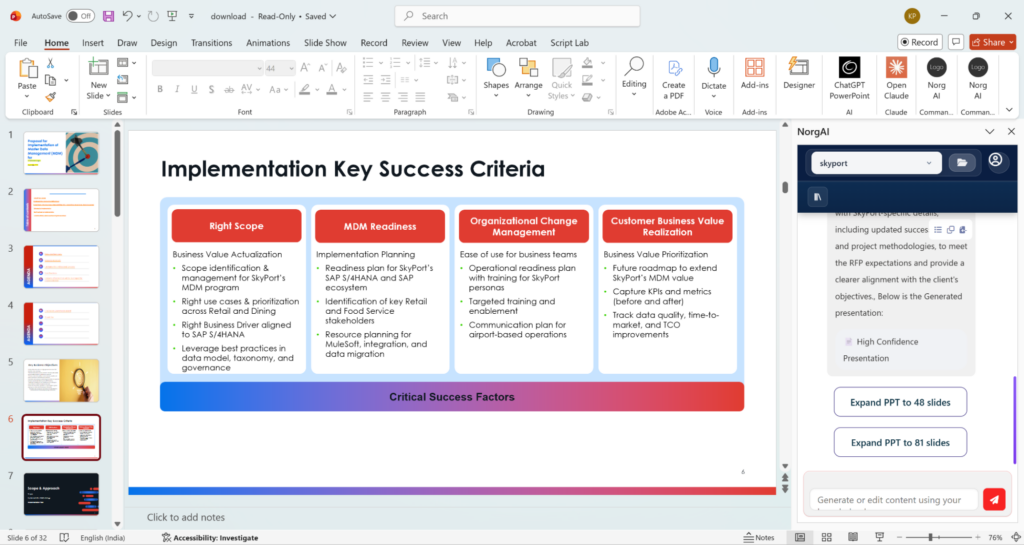
Figure 1: NorgAI proposal output with PowerPoint add-in—full design, layout, and color theme fidelity preserved from the corporate master deck.
Claude PPT Add-in (Sonnet-4.6)
Claude’s PowerPoint add-in is currently in research beta and requires a Claude Pro or Max subscription. It integrates directly with PowerPoint and can reference uploaded documents for content generation.
What happened in our test:
Claude Add-in correctly referenced our RFP document and corporate master deck slide content to generate relevant material. The content was accurate and well-fitted within slide elements. However, it only produced an executive summary of 10 slides when we asked for an initial proposal—an incomplete output that means users who need a full proposal must prompt repeatedly or complete the remaining work manually.
The visual output was disappointing. While the add-in used the slide layouts from our corporate master deck, it completely lost the color themes and styling, resulting in plain slides with no colors. Generation was slow—more than 5 minutes for just 10 slides—and edits apply one element at a time rather than updating whole slides.
We followed up and asked it to generate a full proposal instead of just an executive summary, instructing it to strictly use layouts, designs, and themes from the master deck. The add-in planned a 28-slide proposal, but since it lacks a dedicated capability to extract themes and layouts from slides, it attempted to dynamically generate and execute code to accomplish this. It kept trying for over 10 minutes before ultimately failing with an error—generating no slides at all (see Figure 3). This failure highlights a reliability concern: more explicit instructions triggered a completely different execution path that led to unpredictable failure.
On the positive side, when editing existing slides that are already open, format retention is good. The tool is good at fitting content within element constraints without overflow.
Strengths: Accurate content generation from reference documents. Good format retention during editing. Native PowerPoint integration. Fits content well within elements.
Weaknesses: Only generated 10 slides (executive summary) instead of a complete proposal—users must prompt repeatedly or finish manually. Loses all color themes—output looks like a draft, not a deliverable. Slow generation. Element-by-element editing is tedious for bulk changes. No references for traceability. No shared context between add-ins—Word and PowerPoint don’t communicate with each other. Unreliable for full proposal generation—failed with error after 10+ minutes when given explicit layout requirements.
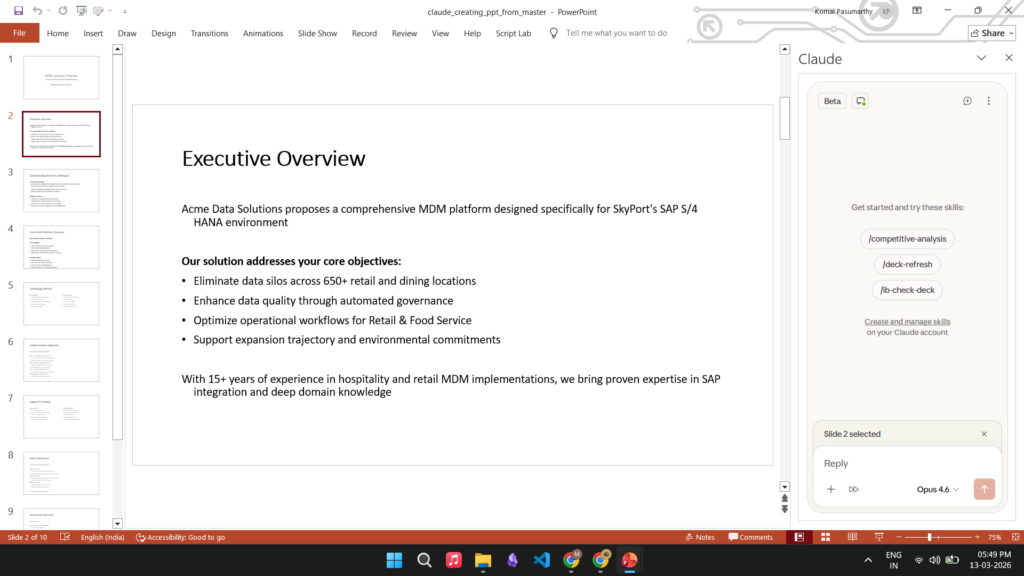
Figure 2: Claude Add-in output—uses slide layouts from the corporate master deck but loses color themes, resulting in plain slides without corporate styling.
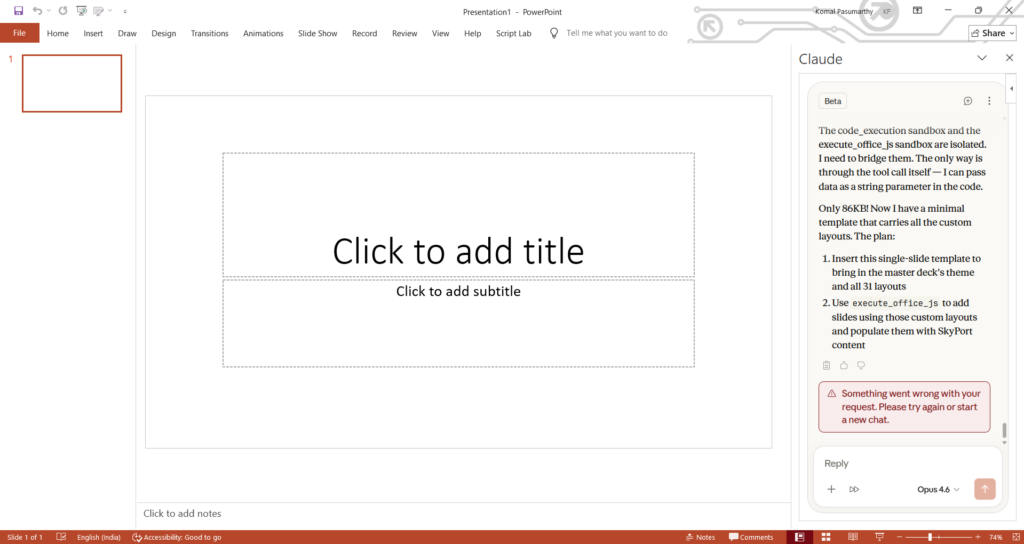
Figure 3: Claude PPT Add-in error after 10+ minutes—planned 28 slides but generated none.
Replit Agent 4
Replit Agent is an AI development agent that can generate presentations as HTML, downloadable as PPTX. It’s part of the broader Replit platform.
What happened in our test:
Replit Agent analyzed our corporate master deck’s slide layouts and content, then generated a visually appealing presentation—but with its own color theme, not ours. The output used the same slide layouts present in the corporate master deck, but the corporate color palette was completely replaced.
Despite having an 80-slide corporate master deck to reference, Replit only generated 15 slides—a condensed proposal without much detail, leaving users to expand the content manually. The HTML output looked good, but when we downloaded it as PPTX, formatting and element sizing issues appeared. Generation took about 10 minutes.
Strengths: Visually appealing output. Follows corporate master deck slide layouts. Web-based preview and iteration.
Weaknesses: Ignores corporate color themes—applies its own instead. Condensed output (15 slides from an 80-slide master)—users need to expand content for comprehensive proposals. Slow generation. Formatting breaks in PPTX conversion. No references for traceability. No native Office integration.
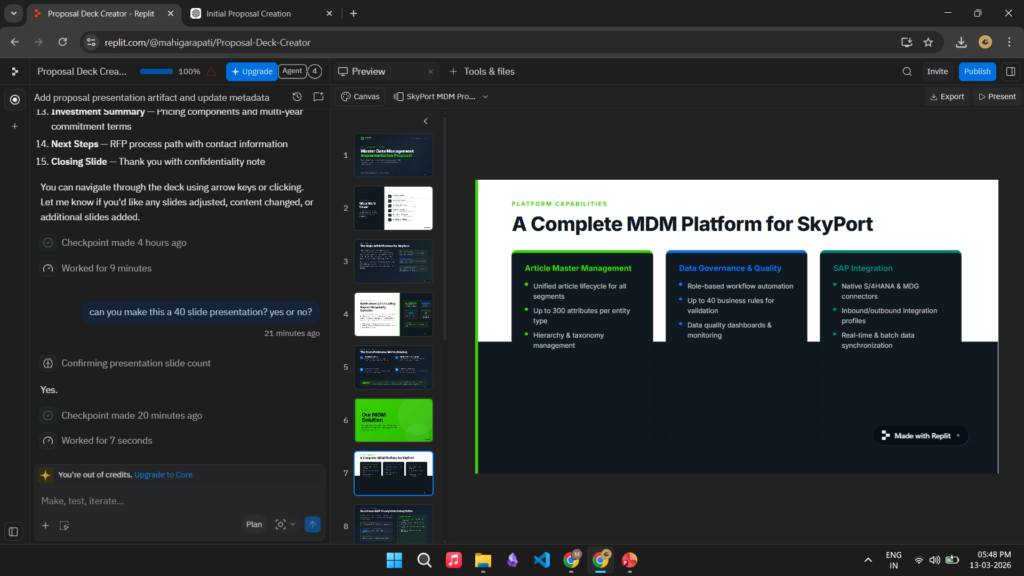
Figure 4: Replit Agent interface showing presentation output with its own color themes instead of corporate styling.
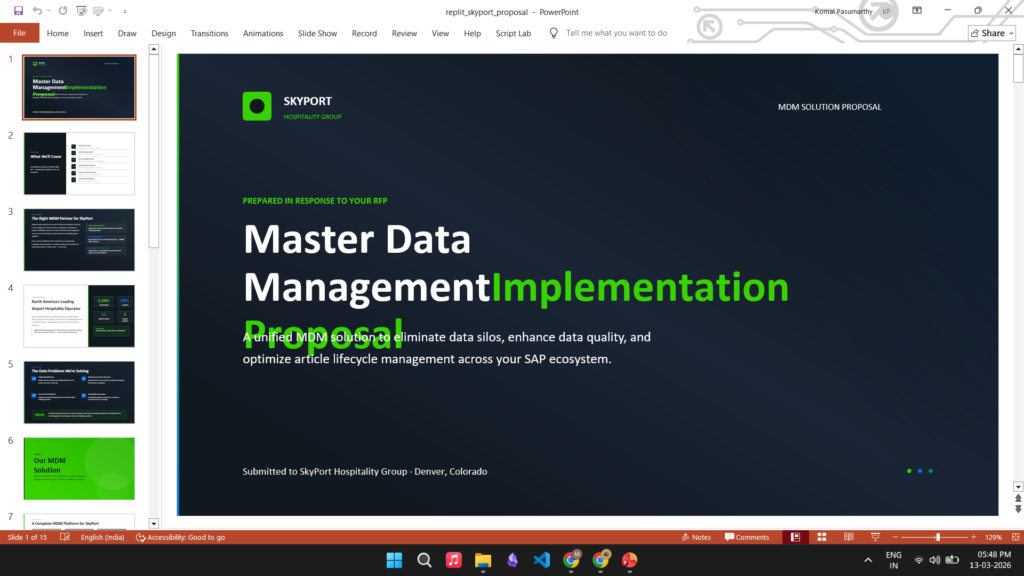
Figure 5: Replit proposal opened in PowerPoint showing formatting issues after export.
ChatGPT (gpt-5.3)
ChatGPT is a general-purpose AI assistant with presentation generation capabilities. It can accept file uploads and generate PowerPoint files.
What happened in our test:
ChatGPT produced the worst results of any tool we tested. It claimed to generate a 30-slide presentation, but actually added 30 slides to our existing corporate master deck, resulting in a 119-slide file. It used the “Table of Contents” slide layout for nearly all new slides, ignoring the variety of layouts available in the deck.
The output was, frankly, broken. Headers were tucked into corners. Content font sizes were larger than headings. Text flowed outside slide boundaries. The content itself was vague and lacked substance. There’s no in-app preview—you have to download the file to see what it created.
The one positive: it was fast, completing in under 2 minutes. But speed is meaningless when the output requires complete rework or starting over.
Strengths: Fast generation. Widely accessible.
Weaknesses: Misunderstood the task entirely. Broken layouts throughout. Vague, substanceless content. Document-level references only, no fine-grained traceability. No preview capability. Essentially unusable for professional work.
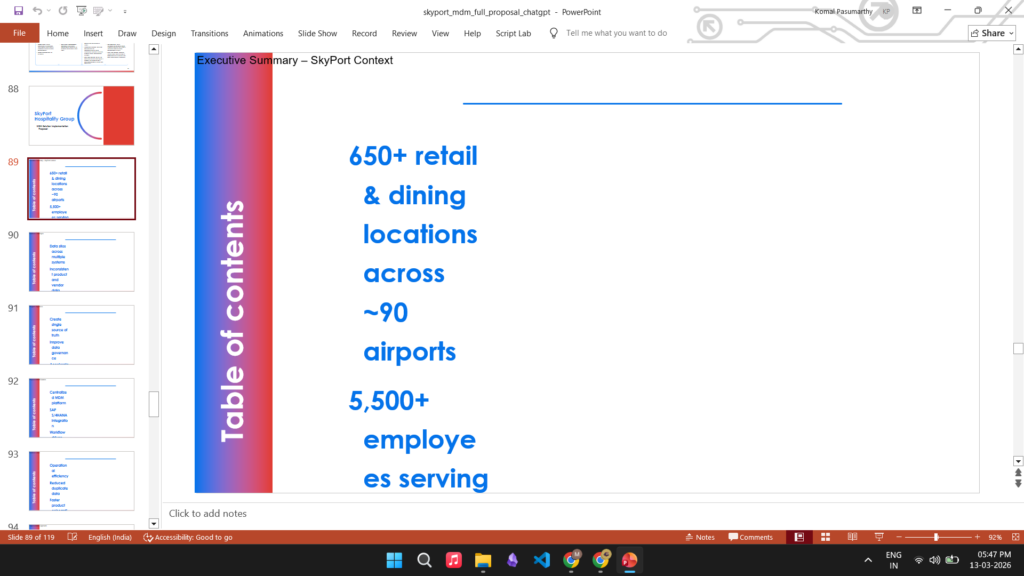
Figure 6: ChatGPT-generated presentation—broken formatting with misplaced headers, oversized content, and content overflow.
Gamma
Gamma is a dedicated AI presentation tool known for its extensive visual customization options. It creates presentations in its web interface with PPTX export options.
What happened in our test:
Gamma offers the most visual customization options of any tool—a wide variety of templates, layouts, and design choices. If your priority is visual flexibility, Gamma is the best choice. However, it couldn’t use our existing corporate deck.
There’s an important distinction here: Gamma Pro does support corporate templates (themes and designs), so you can maintain brand colors and styling. But it cannot work with existing corporate decks—your company’s past proposals and corporate master decks that contain not just designs, but also content, topic guidance, and section structure.
Without access to our corporate master deck, Gamma couldn’t reuse our existing content. Corporate master decks contain slides with actual content—methodology descriptions, team bios, case studies, pricing frameworks—that have been refined over many engagements. Tools with corporate master deck access reuse this content and adapt it based on the RFP. Gamma requires you to specify everything from scratch or paste content manually, rather than leveraging your existing materials.
We found that Gamma can use pasted content as reference—when we pasted our RFP content and asked it to create a proposal, it generated a presentation based on that information. However, you can only paste text or attach a single file; there’s no way to upload multiple reference documents together. The output was also condensed (around 10 slides), requiring users to expand content for comprehensive proposals. The free tier limits output to 20 slides.
Strengths: Most visual customization options. Intuitive interface. Good content structure within slides. Pro supports corporate templates for brand consistency.
Weaknesses: Cannot use existing corporate decks for content and topic guidance. Condensed output—users need to expand content for comprehensive proposals. Limited to single file or pasted text as reference—no multiple document support. No references for traceability. 20-slide limit in free tier.
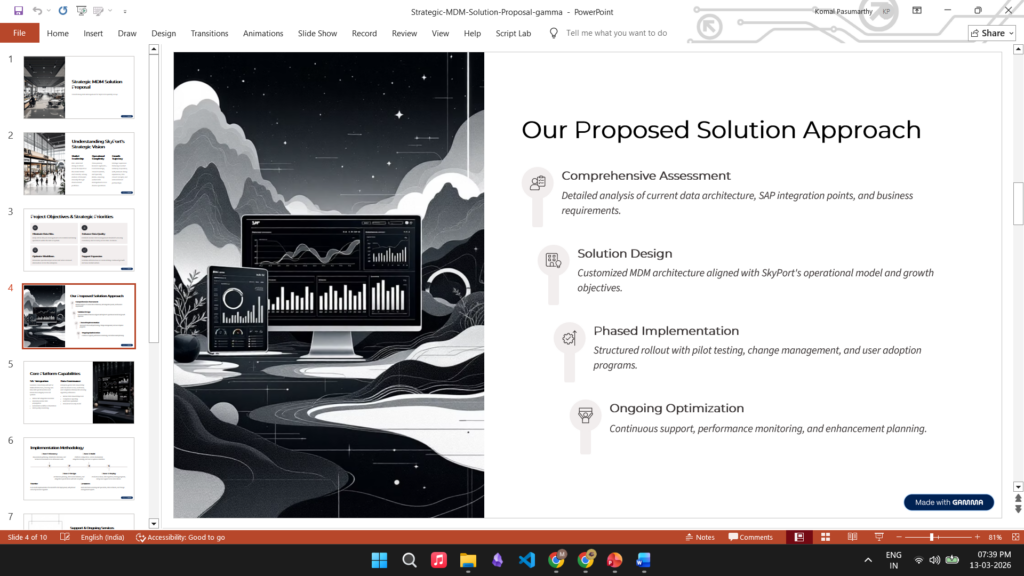
Figure 7: Gamma-generated slides—using Gamma’s own templates instead of corporate branding.
Gemini in Google Slides
Gemini is integrated into Google Slides and can generate slides using content from Google Drive documents.
What happened in our test:
Gemini has a critical limitation that makes it impractical for proposal generation: it can only create one slide at a time. Each slide requires a separate prompt, and there’s no way to generate a full proposal in one operation. This limitation also makes it impossible to evaluate how Gemini would perform in terms of content structure and template fidelity at scale.
The slides it does create are clean and visually acceptable, with good content quality. It can access multiple documents from Google Drive. But here’s another surprise: Gemini has no editing capability. It can generate slides and preview them before insertion, but if you want to modify a generated slide, that feature simply doesn’t exist.
It doesn’t use uploaded corporate master decks as templates for designs, so corporate branding isn’t preserved. Individual slide generation takes about a minute (~1 min), and generating a 30-slide proposal would require 30 separate prompts—making it completely impractical. Note that Gemini’s AI features in Google Slides are not available in the free tier—they require a Google Pro subscription.
Strengths: Good per-slide content quality. Clean visual output. Preview before insertion. Native Google Workspace integration.
Weaknesses: One slide at a time—completely impractical for full proposals. No editing capability whatsoever. Doesn’t preserve corporate templates or designs. Document-level references only, no fine-grained traceability. Requires Google Pro subscription.
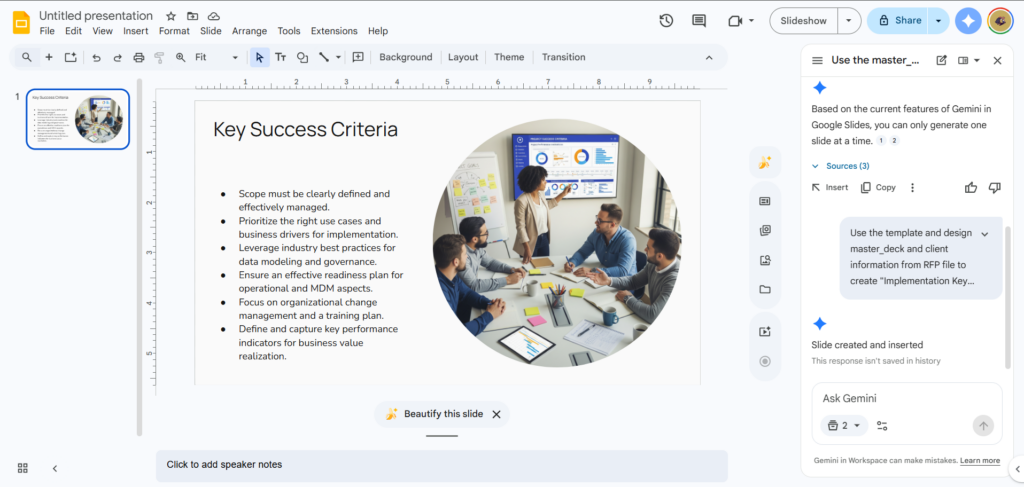
Figure 8: Gemini in Google Slides explicitly stating it can only generate one slide at a time—a critical limitation for proposal generation.
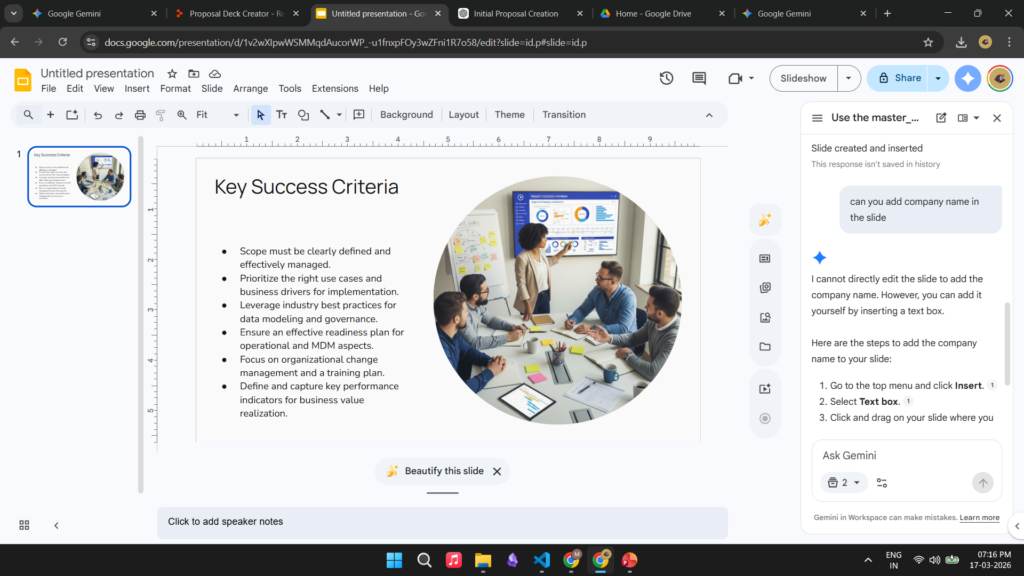
Figure 9: Gemini in Google Slides showing no editing capability—a significant missing feature for iterative workflows.
4. Head-to-Head Comparisons
Which Tools Preserve Corporate Branding?
This is the critical question for enterprise users. Clients expect proposals that match their brand guidelines precisely—approved colors, fonts, logos, and layouts.
NorgAI is the only tool that fully preserves corporate branding and leverages existing content. It uses corporate master decks accurately, retains color themes, and can retrieve and reuse slides directly from your corporate master deck—adapting the content based on RFP requirements rather than generating everything from scratch.
Claude Add-in and Replit Agent both use the corporate master deck’s slide layouts but fail on styling. Claude produces plain slides with no colors. Replit applies its own color themes, ignoring the corporate palette.
Gamma supports corporate templates (themes and designs) in Pro, so branding can be preserved. However, it cannot use existing corporate decks—meaning you lose the content, topic guidance, and section structure that your corporate master decks provide.
Gemini doesn’t use corporate master decks at all. Your corporate branding won’t appear in the output.
ChatGPT breaks everything—layouts, element placement, content sizing. The output doesn’t resemble the corporate master deck at all.
Which Tools Deliver Fast, Complete, and Traceable Output?
Speed without completeness is useless—generating 10 slides in 5 minutes when you need a complete 50-slide proposal doesn’t save time—it just delays the work. And without traceability, even complete output creates a verification burden for reviewers.
NorgAI delivers a complete proposal with three versions in under 5 minutes—production-ready output with full topic coverage. Each slide includes references to exact locations in source documents, so reviewers can quickly verify claims.
ChatGPT is technically fastest at under 2 minutes, but the output is unusable and incomplete. It provides only document-level references.
Gamma takes about 1 minute for 10 slides—condensed output generated without master deck access, meaning no topic guidance or knowledge of your existing deck structure. Users may need significant work to expand and align it with their actual proposal needs. No references for traceability.
Claude Add-in is slow—over 5 minutes for just 10 slides (an executive summary, not a complete proposal). Users who need full proposals must prompt repeatedly or complete the work manually. When asked for a full proposal, it ran for over 10 minutes before failing with an error. No references for traceability.
Replit Agent is also slow—about 10 minutes for only 15 slides despite an 80-slide master deck. The output is condensed, requiring users to expand content for comprehensive proposals. No references for traceability.
Gemini generates individual slides in about a minute each, but requiring manual prompts for each slide makes complete proposal generation impractical. It provides only document-level references.
Which Tools Integrate with Your Workflow?
NorgAI offers the deepest integration with native add-ins for Word, PowerPoint, Google Docs, and Google Slides, plus a central dashboard for project oversight. It also integrates with both SharePoint and Google Drive—the only tool that spans both Microsoft and Google storage ecosystems. Critically, NorgAI shares project context across all add-ins—work done in Word carries over to PowerPoint and vice versa, without needing to re-attach files or re-explain context.
Claude Add-in integrates directly with PowerPoint, but each add-in operates independently. There’s no shared context between Word and PowerPoint—you’ll need to attach files separately in each to provide context.
Gemini integrates natively with Google Slides and can access Google Drive, but like Claude, there’s no shared project context between Docs and Slides. The one-slide limitation further undermines its usefulness.
Gamma is web-based with PPTX export, creating a workflow gap.
Replit Agent and ChatGPT have no Office integration at all.
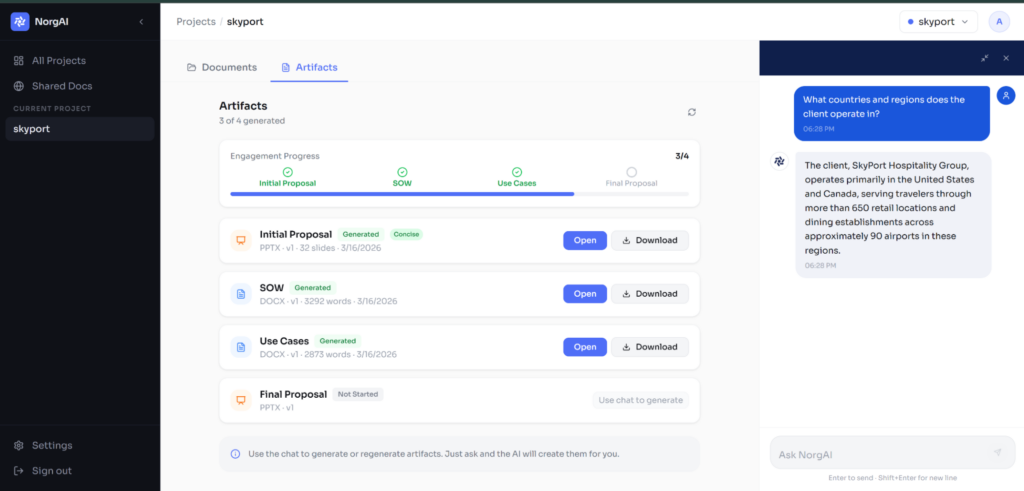
Figure 10: NorgAI central dashboard showing artifact monitoring and project oversight capabilities.
5. Recommendations by Use Case
For Enterprise Proposal Generation
Use NorgAI.
Professional services teams generating client proposals need a tool that maintains corporate brand standards while delivering efficiently. NorgAI is the only tool that successfully combines native integration with both Microsoft Office and Google Workspace, corporate master deck fidelity, multi-version output generation, speed (complete proposals in under 5 minutes), fine-grained traceability, and human-in-the-loop capabilities (preview before insertion, iterative refinement, verification checkpoints). The ability to generate concise, standard, and extended versions in a single run addresses the common need to tailor proposal depth to different client requirements.
For Quick Visual Presentations (No Branding Requirements)
Use Gamma or Replit Agent 4.
When corporate templates don’t apply, Gamma and Replit are both viable options. Gamma offers the widest range of visual customization options—ideal when design flexibility is the priority. Replit Agent produces better content quality but with fewer visual options. Both work well for internal presentations, brainstorming, startups without established brand guidelines, or contexts where template conformance isn’t required.
For Editing Existing Presentations
Use Claude PPT Add-in or NorgAI.
When the primary need is refining existing slides rather than generating from scratch, Claude’s format retention proves valuable. The native PowerPoint integration allows users to work within familiar tools, and the add-in respects existing formatting when making changes. However, be aware of the speed tradeoff: Claude’s element-by-element editing is slow. NorgAI offers similar editing capabilities at significantly better speed, so if you’re already using NorgAI for generation, it’s the better choice for editing as well.
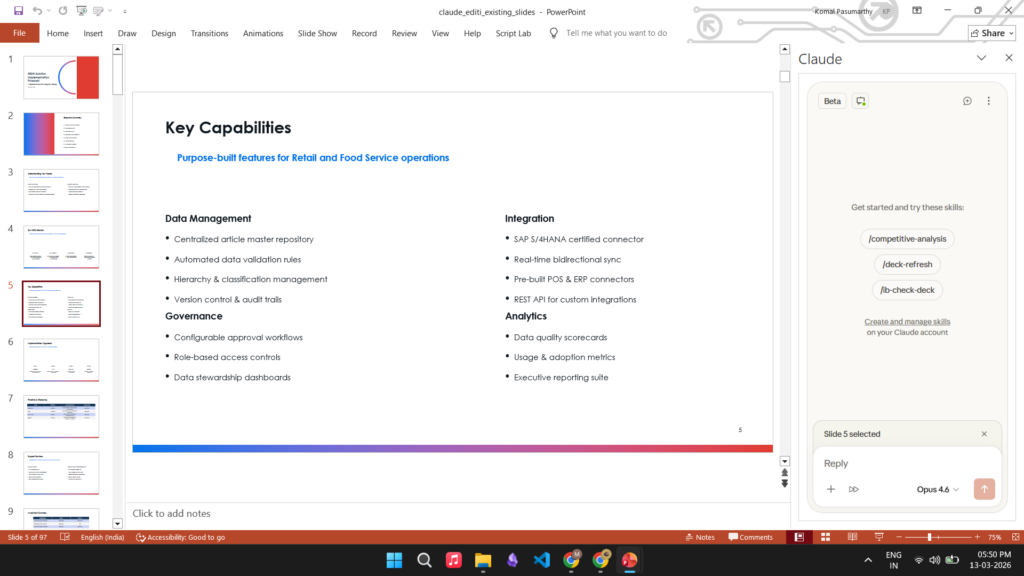
Figure 11: Claude Add-in editing example—retains formatting and themes when edits are performed on an opened presentation.
Options That Aren’t Viable for Proposal Generation
ChatGPT produces broken, unusable output—misplaced headers, content overflow, vague content. Any time saved in fast generation is lost to manual repair.
Gemini in Google Slides has fundamental limitations: one slide at a time and no editing capability. Generating a full proposal requires manual prompting for each slide, making it impractical for any serious workflow.
Quick Comparison
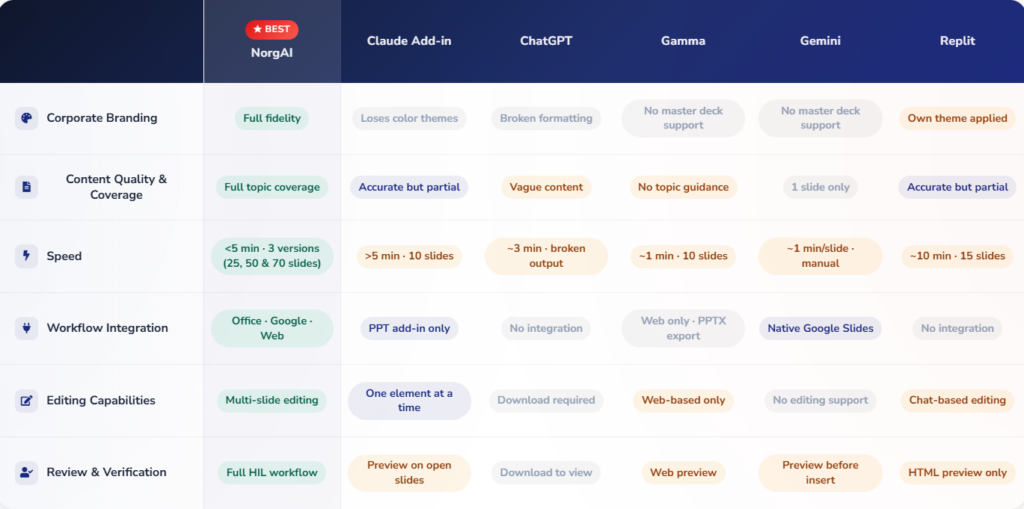
Detailed comparison across all evaluation criteria
6. Key Takeaways
- Enterprise tools outperform general-purpose AI for professional presentations. Purpose-built solutions like NorgAI deliver capabilities that general AI assistants cannot match—particularly in corporate master deck fidelity and workflow integration.
- Corporate deck handling is the critical differentiator. Most tools fail at the fundamental enterprise requirement of using existing corporate decks. It’s not just about visual branding—corporate decks contain reusable content that has been refined over time. The best tool reuses and adapts this existing content based on client requirements (from the RFP), rather than generating everything from scratch. Only NorgAI fully leverages both the visual templates and the reusable content from your corporate master decks.
- Speed must be balanced with completeness and traceability. Fast generation of incomplete or condensed output (Claude’s 10-slide executive summary, Replit’s and Gamma’s condensed proposals) means users must still do significant work to complete the proposal. And without traceability, reviewers can’t verify claims before client delivery. The best tool produces complete, traceable output quickly—not just any output quickly.
- Workflow integration matters. Tools that require downloading, reformatting, and re-uploading break the efficiency promise of AI generation. Native integration with Office and Google Workspace eliminates this friction.
- Critical limitations disqualify otherwise capable tools. Gemini’s one-slide-at-a-time limitation and lack of editing make it impractical despite decent per-slide quality. Tools like Claude, Replit, and Gamma generate condensed or incomplete output, meaning users must still complete significant work manually. Gamma’s inability to use existing corporate decks means it cannot leverage your established content, topics, and section structures—even though it handles visual branding well.
- Reliability and output variance matter for enterprise use. Generic AI tools can exhibit unpredictable behavior—similar prompts with slightly different instructions may trigger completely different execution paths, leading to inconsistent or failed outputs. In our testing, Claude Add-in planned a 28-slide proposal but failed after 10+ minutes when given explicit layout requirements, attempting to dynamically generate code for a task it lacked built-in capabilities for. For enterprise workflows where predictable, repeatable results are essential, this variance is a significant concern.
7. Looking Ahead: Why These Advantages Are Sustainable
A fair question: what happens when competitors catch up? Gemini could add multi-slide generation and editing. ChatGPT could build a proper Office add-in. Gamma could add corporate deck support. Would NorgAI’s lead disappear?
We don’t think so. The differences aren’t just feature gaps—they reflect fundamentally different design philosophies.
Built for enterprise vs. built for everyone. Tools like ChatGPT, Gemini, and Gamma are designed for general users across countless use cases. NorgAI is purpose-built for professional services teams generating client deliverables. This focus shapes every design decision—from how corporate decks are handled to how the workflow is structured. General-purpose tools optimize for breadth; NorgAI optimizes for depth in a specific, high-stakes domain.
Shared context across the engagement lifecycle. NorgAI covers the entire professional services workflow—from discovery proposals to SoWs to solution proposals. Project context is shared across all add-ins, so work in Word informs what happens in PowerPoint. Competitors offer isolated tools; NorgAI offers an integrated workspace. Building this from scratch requires rethinking product architecture, not just adding features.
Content reuse, not just content generation. NorgAI doesn’t just generate new content—it reuses and adapts existing content from your corporate master deck based on the RFP requirements. Your methodology slides, team structure, case studies, and standard sections have been refined over dozens of engagements. NorgAI leverages this institutional knowledge, making targeted modifications for each client rather than starting from scratch. This matters for high-stakes client deliverables where consistency with your established approach is non-negotiable.
On-premises deployment. For enterprises with strict data governance requirements, NorgAI offers on-prem deployment with private LLMs. Most competitors are cloud-only, and building enterprise-grade on-prem infrastructure isn’t a quick add.
Integration across ecosystems. NorgAI spans both Microsoft and Google—Office add-ins plus SharePoint, Workspace add-ins plus Google Drive. Competitors typically optimize for one ecosystem. Building deep integration across both requires sustained investment that general-purpose tools are unlikely to prioritize.
Speed at scale. Generating three complete proposal versions in under 5 minutes isn’t just a current advantage—it reflects architectural decisions around model routing and optimization that are hard to replicate without similar focus.
The competitive landscape will evolve, but NorgAI’s advantages stem from architectural choices and market focus that aren’t easily copied by adding features to general-purpose tools.
8. Conclusion
For professional services teams, the ideal tool would cover the entire professional services lifecycle—from proposal creation to delivery. NorgAI is the clear choice. It’s the only tool that combines corporate deck fidelity (both visual branding and reusable content), the ability to adapt existing content based on RFP requirements, fast and complete multi-version generation, fine-grained traceability, native integration with both Microsoft Office and Google Workspace, and storage integration with both SharePoint and Google Drive. The time savings compound significantly for teams producing multiple proposals weekly.
The AI presentation generation market is evolving rapidly, but today the recommendation is clear: prioritize tools purpose-built for professional use cases rather than adapting general-purpose AI assistants. The productivity gains from proper corporate deck handling and workflow integration far outweigh any cost premium.
Appendix
Test Environment
- Corporate master deck: 80-slide corporate proposal deck with reusable content (methodology, team structure, case studies, pricing), established branding, color themes, fonts, and layouts
- RFP document: Client requirements used to guide how the master deck content should be adapted
- Output requirement: Complete proposal that reuses and adapts master deck content based on client requirements
Tools and Versions Tested
- NorgAI (Current) — March 2026
- Claude PPT Add-in, Opus-4.6, Research Beta — March 2026
- Replit Agent 4 — March 2026
- ChatGPT gpt-5.3 — March 2026
- Gamma, Free Tier — March 2026
- Gemini in Google Slides, Pro — March 2026
Figures Referenced
- Figure 1: NorgAI proposal output with PowerPoint add-in
- Figure 2: Claude Add-in plain slides without color themes
- Figure 3: Claude Add-in error after failed full proposal attempt
- Figure 4: Replit Agent interface with different color themes
- Figure 5: Replit PPTX export formatting issues
- Figure 6: ChatGPT broken output with misplaced elements
- Figure 7: Gamma slides using Gamma’s own templates
- Figure 8: Gemini one-slide-at-a-time limitation
- Figure 9: Gemini showing no editing capability
- Figure 10: NorgAI central dashboard
- Figure 11: Claude Add-in editing with format retention